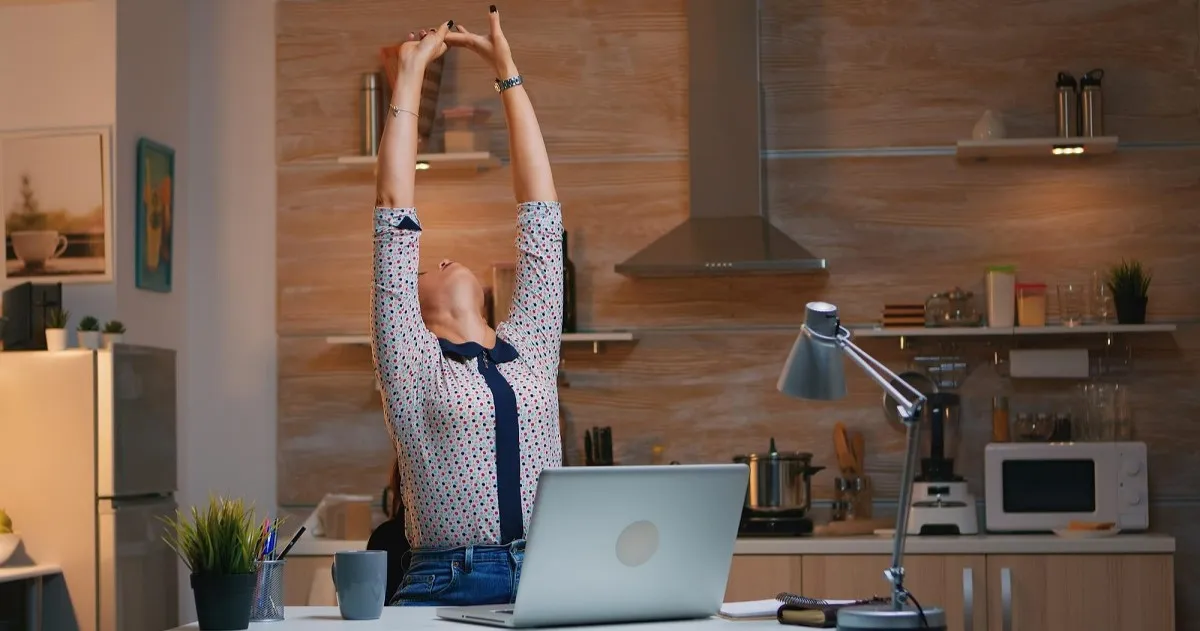
Your back has been keeping score all along.
Every time you lean forward to read a small font. Every time your shoulders creep up toward your ears during a deadline crunch. Every time you crane your neck at a monitor that's two inches too low. These micro-adjustments feel harmless in the moment, but they add up — hour by hour, shift by shift — until one morning you wake up and the dull ache in your lower back simply doesn't go away.
This is not bad luck. It is bad ergonomics.
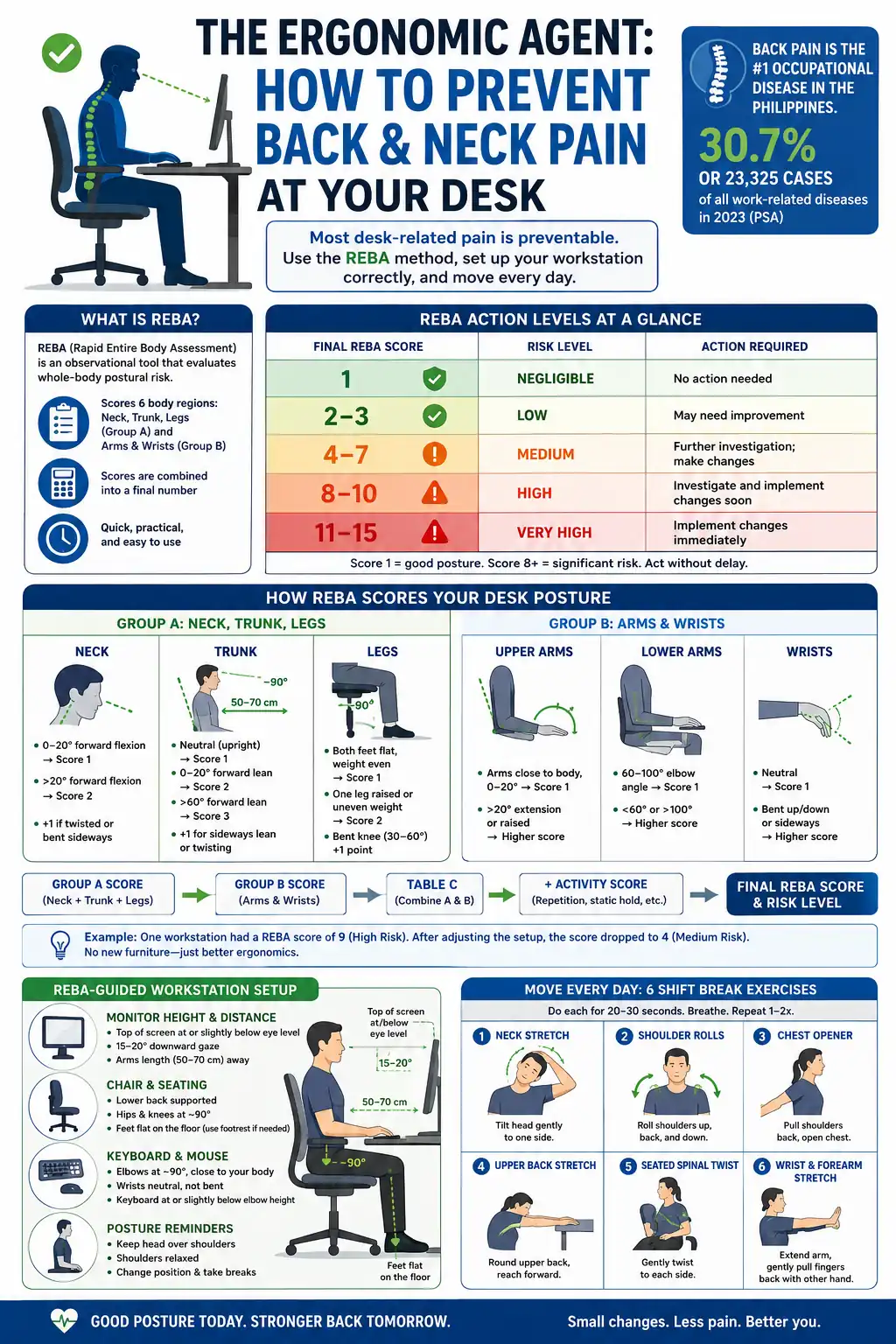
And here is the hard number that should make every Filipino desk worker pay attention: back pain is the leading occupational disease in the Philippines. According to the Philippine Statistics Authority's 2023 Integrated Survey on Labor and Employment, back pain accounted for 30.7 percent — or 23,325 documented cases — of all work-related diseases among formal establishments that year. Neck and shoulder pain ranked second at 11.6 percent.
The good news is that most of this is preventable. You do not need an expensive ergonomic consultant or a brand-new chair. You need the right framework for assessing your posture, a checklist of workstation fixes, and a handful of exercises you can do between tasks.
That framework is called REBA.
What Is the REBA Method?
REBA stands for Rapid Entire Body Assessment. It is an observational ergonomics tool developed by Sue Hignett and Lynn McAtamney (published in Applied Ergonomics, 2000) specifically to evaluate whole-body postural risk — including the lower extremities — in real working environments.
What makes REBA useful for desk workers is its practicality. You do not need a degree in occupational health or expensive equipment to use it. A printed worksheet and a pen are enough. With a little practice, an assessment takes minutes.
The method works by scoring six body regions — neck, trunk, legs (Group A) and upper arms, lower arms, wrists (Group B) — based on how far each part deviates from a neutral, low-stress position. Those scores are combined into a single final number that maps to a risk level and recommended action.
REBA Action Levels at a Glance
| Final REBA Score |
Risk Level |
Action Required |
| 1 |
Negligible |
No action needed |
| 2–3 |
Low |
May need improvement |
| 4–7 |
Medium |
Further investigation; make changes |
| 8–10 |
High |
Investigate and implement changes soon |
| 11–15 |
Very High |
Implement changes immediately |
A score of 1 means your posture is close to neutral. A score above 8 means your body is under significant musculoskeletal strain and changes should happen without delay.
How REBA Scores Your Desk Posture
Understanding how REBA calculates risk helps you see why specific workstation adjustments matter. Here is a simplified walkthrough for a typical office setup.
Group A: Neck, Trunk, and Legs
Neck
- 0–20° forward flexion → Score 1 (safe range)
- More than 20° forward flexion → Score 2
- Add 1 point if the neck is twisted or bent sideways
If you are reading this with your chin jutting toward your screen, your neck is probably flexing well past 20 degrees. That earns a score of 2 before any other factor is counted.
Trunk
- Neutral (upright) → Score 1
- 0–20° forward lean → Score 2
- More than 60° forward lean → Score 3
- Add 1 point for sideways lean or twisting
The classic "desk hunch" — rounded shoulders, forward lean, spine curved — typically scores 3 or higher in this section alone.
Legs
- Both feet flat on the floor, weight evenly distributed → Score 1
- One leg raised or uneven weight distribution → Score 2
- Bent knee (30–60°) adds 1 more point
Group B: Arms and Wrists
Upper arm position, elbow angle, and wrist deviation are scored here. Reaching forward for a keyboard that is too far away, or mousing with your elbow unsupported, adds significant points in this group.
Final Score
Group A and B scores are cross-referenced in Table C, then an Activity Score is added for repetitive or static holding tasks (common in data entry and call center work). The final number tells you whether your workstation needs immediate attention.
In one real-world example, a workstation assessment produced a REBA score of 9 — high risk. After repositioning the work method, the score dropped to 4. No new furniture was purchased. Only the setup changed.
REBA-Guided Workstation Setup
Think of the following adjustments as reducing your REBA score one section at a time.
Monitor Height and Distance
The goal is a neck score of 1 — neutral flexion of 0 to 20 degrees.
- Position the top edge of your monitor at or slightly below eye level. Your natural gaze should fall about 15 to 20 degrees downward, which is the comfortable, low-strain viewing angle.
- Distance: arm's length away, roughly 50 to 75 cm (20 to 30 inches) from your face.
- If you use a laptop, elevate it on a stand and connect a separate keyboard. The built-in keyboard forces a choice: either your wrists are comfortable or your neck is. Never both, without a stand.
Field data from ergonomics programs shows that correcting monitor height and distance alone reduces reported neck and shoulder discomfort by 20 to 30 percent within weeks — before any other change is made.
Chair Setup
The chair determines whether your trunk score stays at 1 or climbs to 3.
- Seat height: Adjust so your feet rest flat on the floor and your thighs are parallel to it. Knees should be at roughly 90 degrees. Leave a two-to-three-finger gap between the seat edge and the back of your knees to keep circulation flowing.
- Lumbar support: Your lower back has a natural inward curve. The backrest should support it, not flatten it. If your chair lacks lumbar support, roll a small towel and place it at belt-level behind your back.
- Backrest angle: A slight recline of 100 to 110 degrees is better than sitting perfectly vertical. It distributes spinal load more evenly.
- Armrests: They should support your forearms at elbow height so your shoulders can drop and relax. Raised or absent armrests are a common source of upper trapezius tension.
- If your feet cannot reach the floor at the correct chair height, use a footrest rather than dangling your legs.
Keyboard and Mouse
- Keep the keyboard at elbow height with wrists in a neutral, flat position — not bent up or down.
- Position the mouse within 7 to 8 cm of the keyboard so you do not have to reach or extend your arm to use it. Reaching outward for the mouse elevates the shoulder and raises your upper arm score in Group B.
The Laptop Problem
Laptop users face a structural contradiction: the screen and keyboard are locked together, making it impossible to position both correctly at the same time. The only real solution is a laptop stand plus an external keyboard and mouse. This separates the screen position (eye level) from the typing position (elbow height) and brings both Group A and Group B scores down significantly.
Six Exercises for Your Shift Break Routine
Fixing your setup addresses the environment. Exercises address what prolonged sitting does to your muscles even in a well-configured workstation.
A 2024 study published in Applied Ergonomics found that office workers who took two-minute stretch breaks every 60 minutes reported 41 percent less neck and shoulder pain and 38 percent less lower back discomfort compared to workers who stretched only at lunch. Frequency matters more than duration. A two-minute reset every hour outperforms a ten-minute session once a day.
The following six exercises take under five minutes combined and require no equipment.
1. Chin Tuck
Targets: Deep neck flexors; counteracts forward head posture
How:
- Sit upright or stand against a wall.
- Gently draw your chin straight back — as if making a double chin — without tilting your head forward or down.
- Feel a mild stretch at the base of the skull.
- Hold for 10 seconds. Release.
- Repeat 10 times.
Why it works: Forward head posture adds roughly 4 to 5 kg of extra load to the cervical spine for every 2.5 cm your head drifts forward. The chin tuck resets that alignment by activating the deep neck flexors that pull the head back over the shoulders.
2. Seated Cat-Cow
Targets: Entire spine mobility; reverses thoracic kyphosis from desk hunch
How:
- Sit with both feet flat on the floor, hands resting on your knees.
- Cow: Inhale, arch your back, lift your chest upward, gently look straight ahead or slightly up.
- Cat: Exhale, round your spine, tuck your chin toward your chest, draw your belly inward.
- Move slowly between the two positions for 8 to 10 cycles.
Why it works: Prolonged sitting locks the thoracic spine in a forward curve. Cat-Cow introduces flexion and extension through the full spine, breaking that static pattern and improving blood flow to the intervertebral discs.
3. Shoulder Blade Squeezes
Targets: Rhomboids and mid-trapezius; reverses rounded shoulders
How:
- Sit or stand with arms at your sides, palms facing forward.
- Squeeze your shoulder blades together as if holding a pencil between them.
- Hold for 5 seconds.
- Release slowly.
- Repeat 10 times.
Why it works: Desk work shortens the chest and anterior shoulders while the mid-back muscles lengthen and weaken. This exercise is as much a strengthening movement as a stretch — it directly activates the muscles responsible for pulling your shoulders back into proper alignment.
4. Neck Side Bend and Rotation
Targets: Upper trapezius and levator scapulae; the muscles that tighten first when you sit with a raised monitor or hunch over a phone
How:
- Sit tall, shoulders relaxed.
- Side bend: Slowly tilt your right ear toward your right shoulder. Hold 15 to 20 seconds. Return to center. Repeat on the left.
- Rotation: Slowly turn your head to look over your right shoulder. Hold 10 seconds. Return. Repeat left.
- Do 2 to 3 repetitions on each side.
Tip: Do not force the range. If you feel sharp pain rather than a gentle stretch, reduce the angle.
5. Thoracic Extension
Targets: Mid and upper back; counteracts thoracic kyphosis
How:
- Sit near the edge of your chair and interlace your fingers behind your head.
- Gently arch your upper back over the back of the chair, opening your chest toward the ceiling.
- Hold for 5 to 10 seconds, breathing into the stretch.
- Return to neutral.
- Repeat 5 times.
Alternatively: Stand up, reach both arms overhead, and gently arch your upper back as you inhale. Return to neutral. Repeat 6 to 8 times.
Why it works: Up to 35 percent of adults experience thoracic spine pain. This movement restores extension mobility in the mid-back — the section most compressed by hours of forward-facing desk work.
6. Seated Spinal Twist
Targets: Obliques, thoracic rotation, spinal mobility
How:
- Sit upright, feet flat on the floor.
- Place your right hand on the back of your chair or on your left knee.
- Gently twist your torso to the right, looking over your right shoulder.
- Hold for 15 to 20 seconds, breathing steadily.
- Return to center and repeat on the left.
- Do 2 repetitions per side.
Why it works: Sitting eliminates rotational movement from the spine entirely. Even a gentle twist restores mobility and reduces the stiffness that accumulates through a long shift.
Your Shift Break Schedule
You do not need to do all six exercises at once. Break them up across your shift:
| Break Time |
Exercises |
Duration |
| 60 min into shift |
Chin Tuck + Neck Side Bend/Rotation |
~2 minutes |
| Lunch |
Seated Cat-Cow + Thoracic Extension |
~3 minutes |
| 60 min after lunch |
Shoulder Blade Squeezes + Spinal Twist |
~2 minutes |
| Last hour |
Any two from above |
~2 minutes |
The total is under 10 minutes across an eight-hour day. Research suggests that this distributed approach — small doses of movement throughout the shift — is more effective than a single longer session because it interrupts the sitting pattern rather than simply trying to undo it afterward.
A Quick-Start Checklist for Today
You do not need to overhaul everything at once. Start here:
These six actions take less than ten minutes to implement and zero pesos to execute.
When to See a Professional
Self-assessment using REBA principles and regular movement breaks are effective for prevention and early-stage discomfort. However, if you experience any of the following, consult a physical therapist or occupational health professional:
- Pain that radiates down the arm or leg
- Numbness or tingling in the hands or fingers
- Neck or back pain that persists after two to three weeks of workstation corrections
- Sharp pain during any of the exercises described above
Chronic musculoskeletal disorders are among the leading causes of lost workdays and long-term disability. They are also among the most preventable. Your workstation is not fixed — it is adjustable. Your pain is not inevitable — it is addressable.
Start with the monitor. Set the alarm. Tuck the chin.
Your back has been keeping score. Now you can too.
Working the graveyard shift is a reality for millions of BPO workers, but chronic sleep deprivation doesn't have to be the cost of success. These science-backed strategies will help you reclaim your circadian rhythm, improve your performance, and protect your long-term health.